The television is playing sound, the remote is responding and the streaming app appears to be running—but the screen looks unusually dark. You increase the brightness, restart the TV and change the picture mode, yet the problem returns. This is often when homeowners begin wondering whether the smart TV backlight needs replacement.
A backlight problem can make an otherwise working television almost impossible to watch. However, replacing parts without proper diagnosis can waste money because a dark screen may also result from picture settings, an HDMI problem, outdated software, a power-board fault or a damaged display panel. The safest approach is to rule out simple causes first and arrange professional repair when the signs point toward internal hardware.
Understand What the Backlight Does
Most LED and LCD smart TVs use lights behind the display to make the picture visible. When these lights weaken or fail, the television may continue producing an image, but the screen becomes too dark to view normally.
The term “backlight panel” is commonly used, although technicians may actually replace LED strips, a backlight assembly, a driver circuit or another related component.
OLED televisions work differently because their pixels produce their own light. Therefore, an OLED screen showing dark areas does not have the same conventional backlight system found in an LED TV.
Signs That the Backlight May Need Replacement
A completely dark screen with normal sound is one of the strongest warning signs. You may still hear menu sounds, channel audio or streaming content even though the picture is barely visible.
Other possible signs include:
- One side of the screen appearing darker than the other
- Brightness flickering after the TV warms up
- Dark horizontal or vertical sections
- Blue or purple colour appearing across previously white areas
- The picture becoming visible briefly before turning dark
- Uneven brightness that appears on every channel and application
These symptoms suggest a hardware issue, but they do not confirm the exact failed part. A technician should inspect the backlight, power supply and display connections before replacement.
Rule Out Picture Settings First
Open the Picture settings and select Standard mode. Increase the backlight or panel-brightness setting gradually. Temporarily disable Power Saving, Eco Mode, automatic brightness and ambient-light detection.
Some televisions reduce brightness automatically according to room lighting or the content being played. If the display becomes normal after changing these settings, replacement is unnecessary.
Test several sources, including the home screen, a streaming app and live television. A problem that appears only through one HDMI device is more likely connected to the cable, port or external equipment.
Run the Built-In Picture Test
Many smart TVs include a Picture Test under Support, Device Care, Help or Self Diagnosis. This displays an image generated by the television rather than an external source.
If the test picture looks bright and normal, investigate the set-top box, HDMI cable, streaming device or app. When the test image is also dark or uneven, an internal display-related fault becomes more likely.
Restart the TV properly before arranging repair. Switch it off, unplug it from the wall and leave it disconnected for about one minute. Reconnect it directly to a reliable socket and test it again.
When Replacement Is the Right Decision
Backlight replacement is reasonable when the television is otherwise working properly, the display panel is not cracked and the repair cost is significantly lower than the price of a suitable new TV.
It may be especially worthwhile for a relatively recent premium model with good picture quality and several years of expected use remaining.
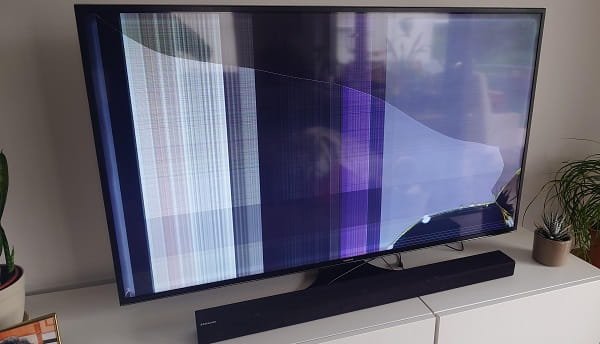
Replacement becomes less attractive when the TV is very old, has repeated power problems or requires several expensive parts. A cracked LCD panel is different from failed backlighting and can be extremely costly to replace. In such cases, buying a new television may offer better value.
Handle the Repair Safely
Do not open the rear cover unless you are trained in television repair. Internal power components can retain electrical charge even after the plug has been removed. The display panel is also thin and can crack easily while being lifted.
Use an authorised or experienced technician who can confirm the model number, identify the failed component and provide a written estimate. Ask whether the repair includes a warranty and whether the entire set of ageing LED strips will be replaced rather than only one failed light.
FAQs
Q: Can I continue using a TV with a failing backlight?
A: You may be able to use it temporarily, but flickering and uneven lighting can worsen. Stop using the TV if it produces a burning smell, unusual heat, electrical noise or repeated power trips.
Q: How long does a replacement TV backlight last?
A: Its life depends on part quality, ventilation, brightness settings and daily usage. Keeping brightness below the maximum level may reduce stress on the lighting system.
Q: Is a dark patch always caused by the backlight?
A: No. Dark patches may also result from panel damage, pressure marks, internal connections or picture-processing problems. A picture test and technician inspection are needed.
Q: Should all LED strips be replaced together?
A: Replacing the full matching set is often more reliable when several strips have aged equally. Replacing only one failed strip may allow another weakened strip to fail later.