Monitoring your daily data usage helps you avoid unexpected bill shocks, manage your internet better, and stay within your plan limits. Whether you use mobile data or WiFi, modern smartphones make it easy to check how much data you have consumed each day.
This guide covers simple methods for both Android and iPhone users.
Why Check Daily Data Usage?
- Prevent exceeding your monthly data limit.
- Identify which apps consume the most data (YouTube, Instagram, Netflix, etc.).
- Manage data for family members or multiple SIMs.
- Make informed decisions when buying new recharge plans.
- Troubleshoot unusually high data consumption.
1. Check Daily Data Usage on Android Phones
Android provides excellent built-in tools.
Method 1: Using Built-in Settings (Easiest)
- Open the Settings app.
- Tap Network & internet (or Connections on Samsung).
- Tap Data usage or Mobile data usage.
You will see:
- Total data used this month.
- A graph showing daily or hourly usage.
- Tap on a specific date in the graph to see daily breakdown.
- Scroll down to view App data usage — this shows which apps used the most data each day.
Additional Options:
- Set a Data warning or Data limit to get alerts.
- Toggle Data Saver mode to reduce consumption.
Brand-Specific Paths:
- Samsung: Settings → Connections → Data usage → Mobile data usage → Daily view.
- Xiaomi / Redmi: Settings → SIM cards & mobile networks → Data usage.
- Google Pixel: Settings → Network & internet → Internet → Data usage.
- Realme / Oppo / Vivo: Similar path under Mobile Data or SIM settings.
2. Check Daily Data Usage on iPhone (iOS)
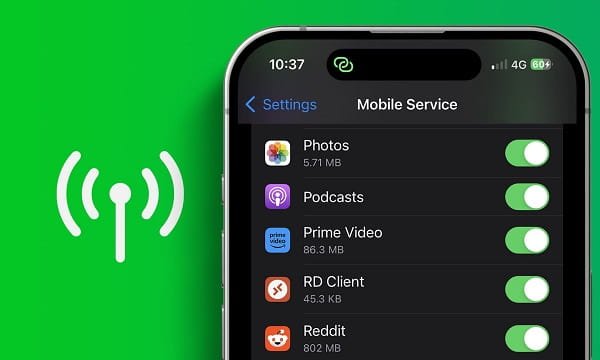
- Open the Settings app.
- Tap Cellular (or Mobile Data).
- Scroll down to see Cellular Data Usage.
- You will see:
- Current period usage (Last 30 days or current billing cycle).
- System Services
- For more detailed daily view, tap on any app listed below to see its data consumption.
Reset Statistics:
- At the bottom, tap Reset Statistics to start fresh tracking from today.
Tip: For WiFi usage, go to Settings → Wi-Fi → Tap (i) next to your network.
3. Check Data Usage Using Operator Apps (Most Accurate for Mobile Data)
These apps give exact data usage as per your telecom provider:
- Airtel: MyAirtel / Airtel Thanks App → Dashboard shows daily usage.
- Jio: MyJio App → Home screen displays high-speed data used today.
- Vi (Vodafone Idea): Vi App → Usage section with daily graph.
- BSNL: BSNL Selfcare App.
Pro Tip: These apps often show more accurate numbers than phone settings because they pull data directly from the network.
4. Quick Methods Without Opening Settings
USSD Codes:
-
- Airtel: Dial *121# or *123#
- Jio: Dial *333#
- Vi: Dial *199#
- BSNL: Dial *124#
- Choose the data usage option in the menu.
Browser Method:
-
- Open Chrome or any browser.
- Visit your operator’s website (airtel.in, jio.com, vi.in, bsnl.co.in).
- Log in with your number and check usage.
5. Check WiFi Data Usage
- On Android: Settings → Network & internet → Data usage → Wi-Fi data usage.
- On iPhone: Third-party apps like “Data Usage Monitor” or check via router admin page.
6. Best Third-Party Apps (Optional)
If you want more detailed daily reports:
- GlassWire (shows beautiful graphs)
- Data Usage Monitor
- My Data Manager
- NetGuard (also blocks background data)
Download only from official app stores.
Useful Tips to Manage Daily Data Usage
- Turn on Data Saver (Android) or Low Data Mode (iPhone).
- Restrict background data for apps like WhatsApp, Instagram, and Facebook.
- Use WiFi whenever possible.
- Download videos and songs over WiFi only.
- Check usage at the same time every day for consistency.
- Set daily alerts in your operator app.
- For dual-SIM phones, check data usage separately for each SIM.
- Update apps regularly — newer versions are often more data-efficient.
Common Issues & Solutions
- Data usage shown is different from operator? Phone settings show approximate usage. Operator apps are more accurate.
- High data usage suddenly? Check which app is consuming data in the list.
- No data usage option? Update your phone’s software.
- Postpaid users: Check unbilled usage in operator apps to avoid bill shocks.
Conclusion
Checking daily data usage on your mobile is quick and helps you stay in control of your internet expenses.
The easiest ways are:
- Android: Settings → Network & internet → Data usage
- iPhone: Settings → Cellular
- Operator apps for precise tracking
Make it a habit to check your data usage every few days. This small step can save you money and prevent unnecessary recharges.